The “Sitting Disease” is real. We all know it. You sit at breakfast. You sit in your car (or Uber). You sit at your desk for 8 hours. You sit on the couch to watch Netflix. By the time you go to bed, your hips are tight, your metabolism is asleep, and you’ve taken maybe 2,300 steps. I tried the standing desk thing. It was great for an hour, and then my feet hurt, so I sat back down.
Then I saw the TikToks. People walking effortlessly on sleek little “Walking Pads” while typing furiously, closing deals, and getting shredded. Is it real? Or is it just another piece of exercise equipment that will end up collecting dust under my bed?
I bought a $350 under-desk treadmill (a Urevo 2-in-1, though they’re all similar) and committed to walking while working for 30 days.
Here is the honest truth about typing while walking, the noise levels, and whether it’s actually worth the money.
Can You Actually Type While Walking?.
This was my biggest fear. I write for a living. If I can’t type, I can’t work.
The Verdict: Yes, but there is a learning curve.
Day 1: I set the speed to 2.0 mph. Big mistake. I felt like I was speed-walking to catch a bus. My mouse hand was shaking. I couldn’t highlight text accurately.
I got motion sick looking at the screen.
Day 3: I lowered the speed to 1.2 mph. This is the sweet spot. At 1.0 – 1.5 mph, your upper body stays relatively still. You can type emails, write slack messages, and do research effortlessly.
What you CAN do:
-
Write articles (once you find your rhythm)
-
Answer emails (easy)
-
Read documentation
-
Zoom calls (if you turn off video or don’t mind bobbing slightly)
What you CANNOT do:
-
Precision design work (Photoshop/Figma is hard)
-
Complex spreadsheets (clicking tiny cells is annoying)
-
Deep, intense focus work (sometimes the movement is distracting)
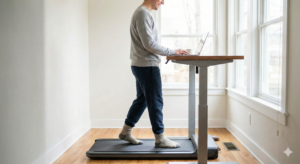
The “Sweat Factor” (Do You Need a Shower?)
If you are walking at 1.5 mph, you are not doing cardio. You are just… existing in motion. I wore jeans and a t-shirt. After 60 minutes of walking, I wasn’t sweaty. I was “warm.” However, if you crank it up to 2.5 mph or 3.0 mph during a meeting, you will break a sweat.
My Strategy: I walk in 45-minute “sprints.”
-
9:00 AM – 9:45 AM: Walk and clear Inbox.
-
10:00 AM: Sit down for deep work.
-
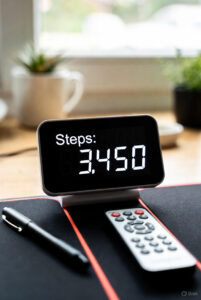
1:00 PM – 1:45 PM: Walk off the post-lunch slump. This gets me roughly 7,000 steps without ever needing to change clothes or shower.
The Setup: What You Need
You cannot just buy a treadmill. You need the ecosystem.
-
A Standing Desk: Obviously. It needs to be motorized because you will switch between sitting and walking 4-5 times a day. If you have a manual crank desk, you will get lazy and stop switching.
-
The Treadmill: Look for a “Walking Pad” (no handrails). It needs to slide under the desk easily.
-
Shoes (or thick socks): Don’t walk barefoot. The belt texture is rough. I keep a pair of “indoor sneakers” next to the desk.
The Noise Level: Will Your Coworkers Hate You?
If you work from home alone: It’s fine. It sounds like a white noise machine or a fan. If you are on Zoom: The noise cancellation on modern mics (AirPods, Blue Yeti) cuts it out completely. No one on my calls knew I was walking until I told them. If you work in an open office: Do not do this. It is audible.
The whirrr-whirrr-whirrr of the belt will drive your neighbor insane within 20 minutes. This is a WFH tool only.
Pros and Cons
Pros:
-
Insane Step Counts: I hit 10,000 steps by 2 PM without leaving my office.
-
Energy Boost: The “2 PM Slump” vanished. Walking wakes up your brain better than caffeine.
-
Back Pain Relief: Walking engages your core and hips. My lower back pain (from the chair) disappeared.
Cons:
-
The Shuffle: Moving the treadmill out of the way when you want to sit is annoying. It has wheels, but it’s still a 60lb object.
-
Static Shock: Walking creates static electricity. I shocked myself on my laptop twice. (Fix: Get a treadmill mat or anti-static spray).
-
Price: It’s a $300+ investment.
The Verdict: Is it Worth It?
If you work from home and struggle to find time for the gym, yes. It is the only way to be active while earning money. It turns “sedentary time” into “active time.”
My recommendation: Don’t buy the $1,000 name brands.
The technology is simple (it’s a motor and a belt). I tested the Urevo / WalkingPad from Amazon ($300 range). It’s sturdy, quiet enough, and slides under my couch when I’m done. Just remember: Start slow. 1.2 mph is productivity mode. 3.0 mph is for when the camera is off.
Read Also: The $300 Home Office: How to Fix Your Back Without Going Broke (2026 Guide)