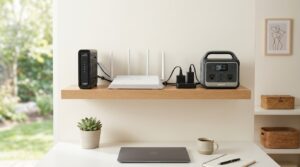
Here’s some genuinely good news, after all the CPAP math in our last runtime breakdown: keeping your internet alive during an outage is one of the cheapest, easiest things you can do with a power station.
A wifi router barely sips power compared to almost anything else in your house — which means the real question isn’t “can my power station handle this,” it’s “how many days, not hours, will it last.”
Let’s actually do the math instead of just saying “not much.”
How Many Watts Does a Wifi Router Actually Use?
Most home routers draw surprisingly little. Independent measurements and manufacturer specs put the typical range at 5 to 20 watts, with 10 watts as a reasonable average for a standard router from a major manufacturer.
Where you land in that range depends on the setup:
| Router Type | Typical Wattage |
|---|---|
| Basic/entry-level router | 5–10W |
| Mid-range router | 10–15W |
| High-performance gaming or Wi-Fi 6/7 router | 15–20W |
| Each mesh wifi node | 6–18W (per node) |
| Cable or fiber modem | 4–12W |
That last row matters more than people realize. A router alone doesn’t get you internet access — you also need the modem running, and most runtime articles quietly leave that part out.
If you’ve got a combined modem/router gateway, that’s usually already reflected in one wattage number, but if you have them as two separate boxes (common with cable internet), you need to add both together for a realistic total.
The Real Math: How Long Does a Power Station Actually Last?
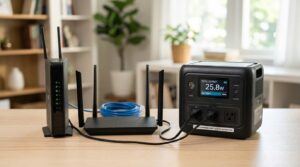
Using the same ~85% inverter efficiency we calculated for a 1000Wh-class station in our CPAP article, that gives you roughly 850Wh of usable AC power.
Here’s what that actually translates to for keeping your network alive:
| Setup | Combined Watts | Runtime on an 850Wh Usable 1000Wh Station |
|---|---|---|
| Basic router only | ~8W | ~106 hours (~4.4 days) |
| Router + separate modem | ~18W | ~47 hours (~2 days) |
| Mesh system (2 nodes) + modem | ~30W | ~28 hours (~1.2 days) |
| Router + modem + small fan (~40W added) | ~58W | ~14.7 hours |
The takeaway: you almost certainly don’t need a big power station just to keep wifi running. Even a much smaller, cheaper unit will comfortably cover several days of internet access on its own, which matters if you’re trying to figure out where to allocate a limited power budget across multiple devices during an extended outage.
Do You Need a Full-Size Power Station Just for Wifi?
Realistically, no — and this is where a lot of people overspend. A compact power station in the 250–300Wh range (roughly a quarter the size of the 1000Wh unit used in the math above) still gives you a full day or more of router-and-modem runtime, based on the same math scaled down.
That’s a meaningfully cheaper entry point if internet access is your main priority during shorter outages, and it frees up your larger station’s capacity for higher-draw essentials like a CPAP machine or a full-size fridge.
If you’re working from home and need more than just internet access — laptop, monitor, router, and modem all running together — the math changes quite a bit.
We cover that exact combination in our guide on powering a home office during a blackout.
A Few Things That Change the Numbers
- Router age and activity level matter. An older router or one handling heavy simultaneous traffic (multiple people streaming or on video calls) will pull toward the higher end of its range rather than the average.
- Mesh systems cost more in total wattage than a single router, since each node draws its own power — worth checking the wattage rating on each individual node, not just assuming it matches a single-router estimate.
- The modem is often forgotten in outage planning entirely. If your internet goes through a separate modem and router, plan for both, not just the device you think of as “the wifi box.”
- Standby draw still counts. Routers and modems are designed to run continuously, so unlike a CPAP or a fridge, there’s no meaningful way to reduce their draw by using them “less” during the outage — they’re either on and pulling their steady wattage, or off.
The Bottom Line
Keeping your internet running during a power outage is one of the lowest-cost, longest-lasting things a portable power station can do — often multiple days on a single charge, even accounting for a separate modem.
The main mistake people make isn’t underestimating router wattage, it’s forgetting to add the modem’s draw on top of it.
Check the labels on both boxes, add them together, and you’ll have a genuinely accurate number instead of a guess.