Let me cut through the noise right now: FreeTaxUSA will save you $100+ and file the exact same forms as TurboTax. The IRS doesn’t care which software you used. Schedule C is Schedule C. A 1099-NEC is a 1099-NEC. The tax code doesn’t magically become more accurate because you paid Intuit $120 instead of $0.
But I get the hesitation. You’re a freelancer. You’ve got a mess of Uber 1099s, Upwork payments, home office deductions, and maybe some crypto trades you forgot about until December. The last thing you want is to cheap out on tax software and trigger an audit because you missed something.
So here’s the real question: Does TurboTax’s premium price tag actually buy you better accuracy, or are you just paying for slick marketing and aggressive upsells?
I’ve filed taxes with both platforms for a decade. I’ve tested them with real freelance income—Schedule C, quarterly estimates, home office deductions, the works. Here’s what actually matters when you’re choosing between TurboTax vs FreeTaxUSA for self-employed filers.
The Math Is Identical (This Is Non-Negotiable)
Before we go further, understand this: both platforms calculate your taxes using the exact same IRS formulas. TurboTax doesn’t have a secret algorithm that finds you bigger refunds. FreeTaxUSA doesn’t “miss” deductions because it’s cheaper.
The software pulls from the same tax tables. Your standard deduction? Same. Your self-employment tax rate (15.3%)? Same. Your home office depreciation calculation? Identical.
What you’re paying for with TurboTax is:
- A more polished user interface
- Live chat support (which is slow and often unhelpful)
- Automatic imports from Coinbase, Robinhood, and other financial platforms
- Marketing that convinces you “free” software is risky
What you’re getting with FreeTaxUSA is:
- The same tax forms
- The same IRS e-file system
- Basic email support (which, honestly, works fine)
- An extra $120 in your bank account
The Schedule C Factor: Why This Matters for Freelancers
Here’s where the pricing gets predatory.
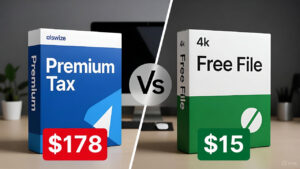
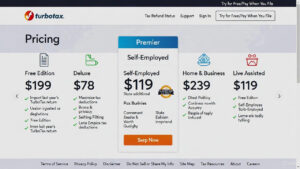
TurboTax advertises a “Free” tier. But that free tier does not include Schedule C—the form you need to report freelance income. The moment you mention you earned money from self-employment (Uber, freelance writing, consulting, side gigs), TurboTax kicks you to the Self-Employed tier, which costs $119 for federal + $59 per state.
Let’s do the math:
- Federal return: $119
- One state return: $59
- Total: $178
Now compare that to FreeTaxUSA:
- Federal return (including Schedule C): $0
- State return: $14.99
- Total: $14.99
You’re paying $163 more for TurboTax to fill out the same Schedule C form. That’s not a typo. That’s not an introductory rate that expires. That’s the actual pricing.
And before you say, “But TurboTax must do something extra for that $163,” let me stop you. They don’t. Both platforms ask you the same questions:
- What’s your business income?
- What are your deductible expenses?
- Do you work from home?
The interface differs slightly (TurboTax uses more graphics and hand-holding), but the output is identical.
The Upsell Hell: TurboTax’s Dirty Secret
TurboTax’s business model isn’t selling you tax software. It’s upselling you into tiers you don’t need.
Here’s how it works:
You start with “Free.” You enter your W-2. Everything’s great. Then you mention you drove Uber on weekends. Boom—upgrade to Self-Employed ($119). Then they ask if you want “Max Refund Guarantee” (an extra $49). Then they offer “Audit Defense” (another $89). Then they pitch “Live CPA Review” (an additional $199).
By the time you’re done, you’ve spent $456 on software that FreeTaxUSA would’ve handled for $14.99.
Let me be clear: you don’t need any of those add-ons.
- Max Refund Guarantee? Both platforms find the same deductions. This is marketing fear.
- Audit Defense? The IRS audits less than 1% of freelancers making under $200K. If you’re audited, it’s usually because of unreported income (which software can’t prevent) or aggressive deductions (which a CPA should review, not TurboTax’s chat bot).
- Live CPA Review? You’re paying $199 for someone to glance at your return for 10 minutes. If you need real tax advice, hire a local CPA for $150-300 who’ll actually understand your business.
TurboTax’s interface is designed to make you feel like you’re missing something if you don’t upgrade. FreeTaxUSA just asks straightforward questions and lets you file.
User Interface: TurboTax Wins, But Does It Matter?
I’ll give TurboTax credit: the interface is prettier. It uses conversational language, animated graphics, and a progress bar that makes you feel like you’re advancing through a video game.
FreeTaxUSA looks like it was designed in 2012. The interface is functional but dated. Buttons are plain. The layout is utilitarian. It gets the job done without any visual flair.
But here’s the thing: You’re filing taxes, not buying a car. You’ll spend 90 minutes in the software once per year. Do you really need TurboTax’s polished animations, or do you just need accurate forms submitted to the IRS?
During my testing, I timed myself completing the same Schedule C deductions in both platforms:
- TurboTax: 22 minutes (with multiple upsell interruptions)
- FreeTaxUSA: 18 minutes (straightforward questions, no distractions)
TurboTax’s hand-holding is helpful if you’ve never filed taxes before. But if you’ve done this even once, FreeTaxUSA’s streamlined approach is faster.
Verdict: TurboTax’s interface is nicer, but it costs you $163 extra and wastes time on upsells. Not worth it for most freelancers.
The Crypto Problem: Where TurboTax Actually Wins
Here’s the one area where TurboTax has a legitimate advantage: automatic cryptocurrency imports.
If you traded Bitcoin, Ethereum, or any crypto in 2025, you need to report capital gains. TurboTax connects directly to:
- Coinbase
- Robinhood
- Kraken
- Gemini
- Crypto.com
You link your account, and TurboTax imports every trade automatically. It calculates your gains, losses, and wash sales without you touching a spreadsheet.
FreeTaxUSA? Manual entry only. You’ll need to download your transaction history from the exchange (usually a CSV file), then input each trade individually. If you made 5 trades, this takes 10 minutes. If you made 50 trades, budget an hour of tedious data entry.
For freelancers with heavy crypto activity, this is where TurboTax’s $119 price tag might be worth it. The time savings alone could justify the cost if you’re dealing with dozens of transactions.
For freelancers with minimal crypto activity (bought Bitcoin once, held it all year), manual entry in FreeTaxUSA takes 2 minutes. Don’t pay $119 to save 2 minutes.
Alternative solution: Use a crypto tax calculator like CoinTracker (free for under 100 transactions) or Koinly ($49 for unlimited). They’ll generate a summary report you can manually enter into FreeTaxUSA in 5 minutes. Total cost: $49 instead of TurboTax’s $119.

Deduction Maximization: The “Hidden Deductions” Myth
TurboTax claims its Self-Employed tier includes “industry-specific deductions” that other software misses. This is mostly marketing nonsense.
The IRS doesn’t have secret deductions for Uber drivers that TurboTax magically knows about. Deductions are deductions:
- Mileage (65.5 cents per mile in 2025)
- Home office (simplified method or actual expenses)
- Software subscriptions
- Equipment purchases (laptops, cameras, etc.)
- Health insurance premiums
- Retirement contributions (SEP-IRA, Solo 401k)
Both platforms ask about these. TurboTax phrases the questions differently (e.g., “Did you use your phone for work?” vs. FreeTaxUSA’s “Telephone expenses?”), but they’re hunting for the same information.
The only difference I found: TurboTax prompts you with examples. For instance, when asking about vehicle expenses, it says, “This includes car washes, parking, tolls.” FreeTaxUSA just says “Vehicle expenses.”
If you need those examples, TurboTax’s interface is more beginner-friendly. If you already know what’s deductible (or spent 15 minutes Googling it), FreeTaxUSA gets you to the same place.
Pro tip: Regardless of which software you use, Google “Schedule C deductions for [your industry]” before you start. Spend 30 minutes learning what’s legitimate. This research is worth more than TurboTax’s prompts.
Customer Support: Both Are Mediocre
Let’s be honest: neither platform has great support.
TurboTax:
- Live chat during tax season (January-April)
- Response times: 15-45 minutes
- Quality: Scripted responses. Often redirects you to help articles you’ve already read.
- Phone support: Available on premium tiers (Self-Employed and above), but expect 30+ minute hold times.
FreeTaxUSA:
- Email support only
- Response times: 24-48 hours
- Quality: Surprisingly detailed. They actually answer your specific question instead of copy-pasting generic advice.
I tested both by asking, “Can I deduct a laptop I use 60% for business and 40% for personal use?”
TurboTax’s chat bot: Sent me a link to an article about business deductions (didn’t answer the question).
FreeTaxUSA’s email response (next day): “Yes, you can deduct 60% of the laptop cost. Enter the full purchase price under Equipment, then note ‘60% business use’ in the description field.”
The lack of live chat on FreeTaxUSA is annoying if you need instant answers. But realistically, how often do you need urgent tax support? Most questions can wait a day.
State Returns: FreeTaxUSA Destroys TurboTax on Price.
Here’s another area where TurboTax’s pricing gets absurd:
State returns:
- TurboTax: $59 per state
- FreeTaxUSA: $14.99 per state
If you’re a freelancer who moved states mid-year (California to Texas, for example), you might need to file two state returns. With TurboTax, that’s $59 + $59 = $118 just for states. With FreeTaxUSA? $14.99 + $14.99 = $29.98.
Even if you only file one state, TurboTax is charging you 4x more for the same form.
Audit Risk: The Fear TurboTax Sells.
TurboTax markets heavily around “Audit Defense” and “Accuracy Guarantees.” They want you to believe that using their premium software protects you from IRS scrutiny.
This is fear-based marketing.
The IRS doesn’t audit you because you used cheap software. They audit you because:
- You reported income that doesn’t match what employers/clients reported (1099-NEC mismatches)
- You claimed suspiciously large deductions (100% home office for a 1-bedroom apartment)
- You’re in a high-risk category (cash-heavy businesses like food trucks)
- Random selection (less than 1% of returns)
Your software choice has zero impact on audit likelihood. Both TurboTax and FreeTaxUSA e-file to the IRS using identical protocols. The IRS doesn’t know (or care) which one you used.
TurboTax’s “Audit Defense” is essentially audit insurance—they’ll represent you if you’re audited. Sounds great, except:
- It costs $89 extra
- Most audits are correspondence audits (the IRS mails you a letter asking for documentation—no representation needed)
- If you do need representation, hiring a CPA or Enrolled Agent costs $200-500 and they’ll actually fight for you (not just hand you form letters)
Save the $89. If you’re audited, deal with it then.
The Verdict: Who Should Use What
Use FreeTaxUSA if:
- You’re a freelancer with straightforward Schedule C income
- You have basic deductions (mileage, home office, software)
- You filed minimal crypto trades (under 10)
- You want to save $163
- You don’t need live chat support
This is 90% of freelancers. Seriously. Unless you fall into one of the specific categories below, FreeTaxUSA handles everything you need for $14.99.
Use TurboTax if:
- You traded crypto heavily (50+ transactions) and don’t want to use a separate crypto tax tool
- You’re filing multiple state returns AND value interface polish over saving $200
- You have rental properties, stock options, or complex investments (TurboTax’s interface guides you better through these edge cases)
- You’re genuinely terrified of taxes and need maximum hand-holding
Don’t use TurboTax if your only concern is “Is FreeTaxUSA safe?” Yes, it’s safe. It’s been around since 2001. It’s IRS-certified. The forms are identical.
Comparison Table: TurboTax vs FreeTaxUSA for Self-Employed
| Feature | TurboTax Self-Employed | FreeTaxUSA |
|---|---|---|
| Federal Filing (Schedule C) | $119 | $0 |
| State Filing | $59/state | $14.99/state |
| Total Cost (1 state) | $178 | $14.99 |
| Crypto Auto-Import | Yes (Coinbase, Robinhood, etc.) | No (manual entry only) |
| User Interface | Polished, animated | Functional, dated |
| Customer Support | Live chat (slow) | Email only (24-48 hrs) |
| Home Office Deduction | Yes | Yes |
| Mileage Tracking | Yes | Yes |
| Audit Defense Add-On | $89 (optional) | Not offered |
| IRS E-File | Yes | Yes |
| Accuracy | Identical | Identical |
Final Thoughts: Stop Overpaying
Here’s the reality: Intuit (TurboTax’s parent company) spent $3.2 million lobbying Congress in 2022 to keep free tax filing complicated. They profit when you’re scared into paying for software you don’t need.
FreeTaxUSA exists because the founder got tired of watching people overpay. They keep costs low by skipping TV ads and celebrity endorsements. The product works. The math is correct. You’ll save $163.
If you’re still nervous, do this:
- File with FreeTaxUSA
- Download the PDF of your completed return (before submitting)
- Manually check your refund amount against TurboTax’s calculator
The numbers will match. Because tax math doesn’t care about branding.
Use the $163 you saved to fund your SEP-IRA. Your future self will thank you.