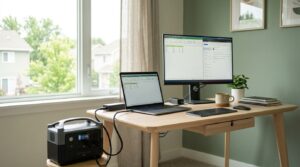
If the power goes out mid-workday, most guides tell you to add up your laptop, monitor, and router wattage and match it to a power station. That math isn’t wrong, exactly — it’s just missing the one detail that changes the answer the most: your laptop already has its own battery.
The power station’s real job in a home-office blackout isn’t keeping the laptop alive — it’s keeping the two things that don’t have a battery of their own running: your monitor and your router.
Get that distinction right and you’ll size your setup very differently than the naive “add it all up” approach.
What a Home Office Setup Actually Draws
Here’s the baseline, using typical figures for each device:
| Device | Typical Draw | Has Its Own Battery? |
|---|---|---|
| Standard laptop (office use) | ~40W average | Yes — typically 4–10 hours internal depending on model and workload |
| 24-inch external monitor | ~25W | No |
| Wifi router + modem | ~18W (combined) | No |
| Phone/misc charging | ~10W | N/A — small draw |
That “has its own battery” column is doing a lot of work here. A modern laptop away from its charger can typically run several hours on its internal battery alone before it needs external power at all — which means, for at least the first stretch of an outage, your power station doesn’t need to power the laptop specifically.
It needs to power the monitor and the router, which have zero runtime of their own the moment the outlet goes dead.
The Real Math: Two Ways to Size This
Naive approach — powering everything continuously: laptop (40W) + monitor (25W) + router (18W) + charging (10W) = ~93W continuous draw.
Smarter approach — prioritizing what has no battery of its own: monitor (25W) + router (18W) = ~43W continuous draw, with the laptop running on its own internal battery until it needs a top-up.
Using the same ~850Wh usable capacity we’ve used throughout this series for a 1000Wh-class station (accounting for ~85% inverter efficiency), here’s how differently those two approaches play out:
| Approach | Continuous Draw | Runtime on 1000Wh Station | Equivalent 8-Hour Workdays |
|---|---|---|---|
| Everything running off the station | ~93W | ~9.1 hours | ~1.1 workdays |
| Monitor + router only, laptop on its own battery | ~43W | ~19.8 hours | ~2.5 workdays |
That’s more than double the effective workdays out of the exact same power station, just by being deliberate about what actually needs it.
How Many Workdays Can You Get From Different Station Sizes?
Using the “smarter approach” (monitor + router, ~43W) as the baseline, here’s what different station sizes get you:
| Station Size (rated) | Usable Capacity (~85%) | Runtime | Workdays (8-hour) |
|---|---|---|---|
| 300Wh | ~255Wh | ~5.9 hours | ~0.7 |
| 500Wh | ~425Wh | ~9.9 hours | ~1.2 |
| 1000Wh | ~850Wh | ~19.8 hours | ~2.5 |
| 2000Wh | ~1,700Wh | ~39.5 hours | ~4.9 |
A compact 500Wh station already covers a full workday of monitor-plus-router runtime, with your laptop’s internal battery filling in the gaps — a much more realistic (and cheaper) starting point than assuming you need a large station just because you added up every device’s full wattage.

A Few Ways to Stretch This Further
- Charge your laptop from the power station only when its internal battery gets low, rather than keeping it plugged in continuously — this is the single biggest lever in the math above.
- Drop screen brightness on the monitor. It’s a smaller effect than the laptop-battery trick, but every bit helps when you’re rationing.
- If you’re deciding between power station models, check how loud they run under sustained load — some units get noticeably audible on a video call, which matters a lot more for a home office than it does for, say, a fridge in another room. We compare this directly in our power station noise level breakdown.
- If you’re shopping specifically with a home office in mind, model choice matters beyond capacity — recharge speed, port selection, and pass-through charging (running devices while the station itself recharges) all vary meaningfully between brands, which we cover in our EcoFlow vs Jackery vs Bluetti comparison.
The Bottom Line
Don’t size your home-office backup power around the naive total of every device’s wattage — size it around what actually has no battery of its own.
A monitor and a router are the real dependents here; your laptop is already carrying several hours of its own runtime, and treating it that way roughly doubles how many effective workdays you get out of the same power station.
For most single-person home office setups, that means a 500–1000Wh station is a genuinely reasonable target, not the larger, more expensive unit the naive math might point you toward.