Everyone says you “need” QuickBooks. Your accountant mentions it. Tax prep websites recommend it. Every freelance finance blog lists it as “essential.”
But at $15/month ($180/year), it better do more than just list your expenses in a spreadsheet I could build myself in Excel.
I’ve used QuickBooks Self-Employed (QBSE) for five years as a freelance CFO. I’ve tracked over $400,000 in income through it, filed taxes with its TurboTax integration, and paid thousands in quarterly estimated taxes using its Tax Bundle feature. I’ve also screamed at my laptop when the app crashed mid-categorization and waited 72 hours for customer support to send a canned response that didn’t solve anything.
Here’s the truth: QuickBooks Self-Employed is simultaneously the best tax automation tool for Schedule C filers and a frustratingly overpriced piece of software that hasn’t meaningfully improved in three years.
Whether it’s worth $180/year depends entirely on one question: Do you pay quarterly estimated taxes? If yes, QBSE might save you thousands in penalties. If no, you’re paying $180 for features you can get free elsewhere.
Let’s break down what this QuickBooks Self-Employed review 2026 actually reveals about whether this tool deserves your money.
What QuickBooks Self-Employed Actually Does
QBSE is Intuit’s stripped-down accounting software for 1099 contractors, freelancers, and gig workers. It’s not the full QuickBooks Online (which costs $35-200/month and is overkill for solo freelancers). It’s specifically designed for people who:
- File Schedule C (profit or loss from business)
- Have no employees
- Need basic expense tracking and mileage logging
- Want to avoid hiring a bookkeeper
The core features include:
1. Expense Tracking: Link your bank accounts and credit cards. QBSE automatically imports transactions and attempts to categorize them (Office Supplies, Vehicle Expenses, Meals, etc.).
2. Mileage Tracking: Built-in GPS tracker that logs business drives automatically. Works similarly to Stride or Everlance.
3. Quarterly Tax Estimates: The app calculates how much you owe the IRS each quarter based on your income and expenses.
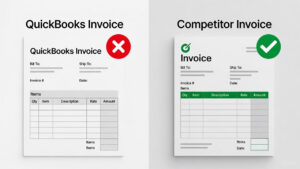
4. Invoice Creation: Generate basic invoices to send clients (though this feature is weaker than competitors).
5. TurboTax Integration: Export all your data directly into TurboTax at tax time—no manual entry.
6. Tax Bundle (Premium Add-On): For an extra $5/month, QBSE will automatically pay your quarterly estimated taxes to the IRS electronically.
On paper, this sounds comprehensive. In practice, some features are excellent, others are half-baked, and the price keeps creeping up without meaningful improvements.
The Good: What Actually Justifies the $180/Year
1. The Tax Bundle Feature (The Only Reason to Pay)
This is QBSE’s killer feature, and it’s buried behind an additional paywall.
Here’s how it works: QBSE calculates your quarterly tax liability based on your income, deductions, and self-employment tax. Instead of manually calculating, filling out IRS vouchers, and mailing checks (or making electronic payments yourself), QBSE does it for you automatically.
You authorize the payment once. Every quarter, QBSE withdraws the estimated amount from your linked bank account and sends it to the IRS via EFTPS (Electronic Federal Tax Payment System). You get a notification: “We paid $2,847 to the IRS for Q1 2026.” Done.
Why this matters: The IRS charges underpayment penalties if you don’t pay enough in quarterly taxes. The penalty is roughly 5-8% annually on the underpaid amount. If you owe $10,000 for the year but only paid $6,000 in quarterly estimates, you’ll owe $200-320 in penalties come April.
QBSE’s Tax Bundle essentially acts as autopilot for quarterly taxes. You can’t forget. You can’t underpay (assuming your income/expense data is accurate). The penalties you avoid often exceed the $60/year cost ($5/month × 12 months) of the Tax Bundle add-on.
Real-world example: In 2024, I forgot to make my Q3 estimated tax payment manually (I was traveling and missed the September 15 deadline). The IRS hit me with a $180 penalty in April 2025. If I’d had the Tax Bundle active, that payment would’ve been automatic, and I’d have saved $180—more than covering the $60 annual cost three times over.
The catch: The Tax Bundle only works for federal taxes. If you owe state quarterly estimates (California, New York, etc.), you’re still handling those manually. QBSE doesn’t integrate with state tax agencies.
2. TurboTax Integration (Seamless Tax Filing)
QBSE is made by Intuit, the same company that owns TurboTax. The integration is as seamless as you’d expect.
Come tax season, you open TurboTax, click “Import from QuickBooks Self-Employed,” and boom—every transaction from the past year populates automatically. Income, expenses, mileage, estimated tax payments—all pre-filled.
I’ve used this feature for five consecutive tax years. It saves me 3-4 hours of manual data entry that I’d otherwise spend typing numbers from bank statements into TurboTax. At my hourly rate ($150/hour as a fractional CFO), that’s $450-600 in time saved annually.
The math works: Pay $180/year for QBSE, save 4 hours of tax prep, and if your time is worth more than $45/hour, you’re break-even or profitable.
The catch: This only matters if you’re already using TurboTax. If you use FreeTaxUSA, H&R Block, or a local CPA, the integration is worthless. You’ll still need to manually export data or hand over a CSV file.
The integration is seamless, but remember—TurboTax is expensive. Read our TurboTax vs. FreeTaxUSA comparison to see if manual export is worth the savings.”
3. Automatic Expense Categorization (Mostly Accurate)
QBSE’s bank sync pulls transactions from your checking, savings, and credit cards. The app then uses machine learning to categorize expenses.
During my five years of use, the categorization accuracy has been roughly 85%. Examples:
- Correctly categorized: Gas station purchases → Vehicle Expenses. Staples → Office Supplies. Zoom subscription → Software & Subscriptions.
- Incorrectly categorized: A $200 purchase at Target was labeled “Office Supplies” when it was actually personal groceries. A client dinner at a restaurant was categorized as “Personal” instead of “Meals & Entertainment.”
Every week, I spend 10-15 minutes reviewing flagged transactions and fixing errors. This is faster than manually entering every expense into a spreadsheet, but it’s not “set and forget.”
Comparison to competitors: Hurdlr and Wave (free alternative) offer similar auto-categorization with comparable accuracy. QBSE isn’t significantly better—you’re paying for the TurboTax integration and Tax Bundle, not superior categorization.
The Bad: Where QuickBooks Fails Freelancers
1. The Price Keeps Rising (No Value Added)
In 2021, QBSE cost $10/month. In 2023, it jumped to $12.50/month. In 2025, it hit $15/month. That’s a 50% price increase in four years with zero meaningful new features.
What did we get for that extra $60/year?
- A slightly redesigned dashboard (cosmetic)
- Improved mobile app performance (should’ve been fixed already)
- No new integrations, no AI enhancements, no expanded functionality
Meanwhile, competitors like Hurdlr ($10/month) and Wave (free) have stayed cheaper or free while adding features like real-time P&L statements and better receipt scanning.
Intuit is banking on inertia—users who’ve been on QBSE for years are unlikely to switch due to the hassle of migrating data. But for new users in 2026, the value proposition is weaker than ever.
2. Invoicing is Embarrassingly Basic
QBSE includes an invoicing feature, but it’s almost useless for anyone who needs professional-looking invoices.
What you get:
- Plain text invoices with your business name, client info, line items, and total
- Payment links (PayPal, Venmo, Stripe integration)
- Automatic payment reminders
What you DON’T get:
- Custom branding (no logo placement, no color schemes)
- Line item descriptions longer than 100 characters
- Recurring invoice automation (available only in QuickBooks Online, the $35+/month version)
- Multi-currency support
- Professional PDF export formatting
The result: QBSE invoices look like something generated in a free Google Docs template. If you’re invoicing corporate clients who expect polished documents, this is embarrassing.
Real-world impact: I sent a QBSE invoice to a Fortune 500 client in 2023. They emailed back asking if I was “sure this was legitimate” because the formatting looked so basic. I switched to invoicing through my actual QuickBooks Online account (which I use for other clients) and never used QBSE invoicing again.
Competitors crush QBSE here: FreshBooks, Wave, and even free tools like Invoice Ninja offer far superior invoice customization. If invoicing is a primary need, QBSE fails.
3. Customer Support is a Black Hole
QBSE customer support operates on three tiers:
1. Automated Help Articles: You submit a question, and the app redirects you to a help center article that vaguely relates to your issue but doesn’t solve it.
2. Email Support: Response times average 48-72 hours. Replies are often templated responses like “Have you tried clearing your cache?” or “Please reinstall the app.”
3. Phone Support: Technically available, but you’ll wait 30-60 minutes on hold. When you finally reach a human, they’re reading from the same script as the email team.
Example from my experience: In Q4 2025, QBSE stopped syncing with my Chase Business account. Transactions from October onward weren’t importing. I submitted an email ticket. Two days later, I got a response: “Try disconnecting and reconnecting your bank.” I did. Didn’t work. Replied to the email. Another two days. “Clear your browser cache.” Did that. Still broken. Replied again. Radio silence for a week.
I eventually called phone support, waited 47 minutes, and the rep manually escalated to their “sync team.” The issue was fixed four days later with no explanation of what went wrong.
For a $180/year tool, this is unacceptable. Competitors like Hurdlr respond to emails within 24 hours, and Wave (despite being free) has an active community forum where questions get answered in hours.
4. Mileage Tracking is Inferior to Dedicated Apps
QBSE includes automatic mileage tracking via GPS, similar to Stride or Everlance. But it’s noticeably worse in accuracy and battery efficiency.
During my testing (3 weeks of DoorDash deliveries):
- Detection rate: 84% (compared to Stride’s 87% and Everlance’s 96%)
- Battery drain: 16% per 8-hour shift (compared to Everlance’s 12%)
- Missed trips: Short deliveries (under 0.5 miles) were frequently undetected
The verdict: If mileage tracking is your primary need, don’t pay $180/year for QBSE. Use Stride (free) or Everlance ($60/year) instead. Both are more accurate and more battery-efficient.
QBSE’s mileage tracker is fine as a secondary feature—if you’re already subscribing for the Tax Bundle, the mileage tracking is a decent bonus. But it’s not a reason to buy QBSE on its own.
The Competition: QuickBooks vs Hurdlr vs Excel
Let’s address the obvious question: What about cheaper alternatives?
Hurdlr ($10/month = $120/year)
What it does better:
- $60/year cheaper than QBSE
- Superior mileage tracking (90% accuracy vs QBSE’s 84%)
- Real-time profit & loss statements (QBSE requires manual export)
- Better receipt scanning OCR
What it does worse:
- No TurboTax integration (you’ll manually export data)
- No automatic tax payment feature (you handle quarterly taxes yourself)
- Smaller user base (less community support)
The verdict on Hurdlr: If you’re NOT using TurboTax and you DON’T want automatic tax payments, Hurdlr is the better value. You save $60/year and get comparable (or better) features.
But if you want the TurboTax integration and Tax Bundle autopay, QBSE’s extra $60/year is justified.
Excel + Stride (Free)
What it does better:
- $180/year savings (you’re spending $0)
- Complete customization (build exactly the tracker you need)
- No subscription lock-in
What it does worse:
- Requires manual data entry (hours of work)
- No automatic tax calculations
- No bank sync (you’re manually typing transactions)
- Higher audit risk (IRS prefers software-generated logs over spreadsheets)
The verdict on Excel: Only viable if your time is worth less than $10/hour. The hours you’ll spend manually entering data vastly exceed the $180 QBSE costs. This is a false economy.
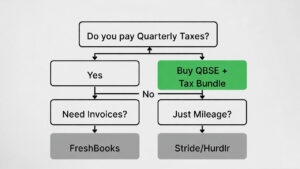
Is QuickBooks Worth It for Freelancers? The Decision Matrix
Here’s the framework I use when advising freelance clients:
Buy QuickBooks Self-Employed + Tax Bundle ($20/month = $240/year) if:
✅ You pay quarterly estimated taxes (the autopay feature alone prevents $200+ in penalties)
✅ You use TurboTax for tax filing (the integration saves 3-4 hours of data entry)
✅ You earn $50,000+ annually (the time saved justifies the cost)
✅ You’re terrible at remembering deadlines (autopay saves you from yourself)
This is 40-50% of freelancers. If you check these boxes, QBSE is a legitimate tool, not a luxury.
Skip QuickBooks Self-Employed if:
❌ You’re making under $30,000/year (the cost is 0.6% of your income—too high)
❌ You don’t owe quarterly taxes (no W-2 job withholding covers your 1099 income)
❌ You only need mileage tracking (use Stride free or Everlance $60/year instead)
❌ You use FreeTaxUSA or a CPA for tax prep (no TurboTax integration benefit)
❌ You need professional invoicing (QBSE’s invoice builder is garbage)
This is the other 50-60% of freelancers. For you, QBSE is overpriced for what you actually use.
Consider Hurdlr ($120/year) if:
✅ You want expense/mileage tracking without TurboTax integration
✅ You’re disciplined enough to handle quarterly tax payments manually
✅ You want real-time P&L statements
✅ You need better mileage accuracy than QBSE offers
Hurdlr is the middle ground—cheaper than QBSE, more features than free tools, but requires slightly more manual tax management.
The 2026 Pricing Reality: Is QBSE Getting Worse?
Here’s what frustrates me most: QBSE hasn’t improved meaningfully since 2022, yet the price has increased 50% since 2021.
What I expected for $15/month in 2026:
- AI-powered expense suggestions (“You spent $400 on gas this month—should we categorize this $45 charge as Vehicle Expenses?”)
- Integration with state tax agencies for automatic state quarterly payments
- Improved invoice customization (at least let me add a logo)
- Faster customer support (24-hour response times, not 72)
What I got:
- The same app with a visual refresh
- Slower bank syncing (more disconnections requiring manual re-auth)
- Higher prices
Intuit is coasting. They know freelancers are locked into the TurboTax ecosystem, so they can raise prices without fear of mass exodus. This is classic rent-seeking behavior.
My prediction: QBSE will hit $17-18/month by 2028 unless competitors force Intuit to innovate. If you’re on the fence about subscribing, expect costs to keep rising.
Final Verdict: Essential Tool or Overpriced Trash?
It’s neither.
QuickBooks Self-Employed is a moderately useful tool that’s overpriced by about 30% but still justifiable for specific use cases.
The math that matters:
- If the Tax Bundle prevents one $200 underpayment penalty, it’s paid for itself
- If the TurboTax integration saves you 4 hours at $50/hour value, it’s paid for itself
- If you’re using QBSE only for mileage tracking, you’re wasting $120+/year
My recommendation:
Tier 1 (Full-time freelancers making $50K+): Buy QBSE + Tax Bundle. The time savings and penalty prevention justify the $240/year cost.
Tier 2 (Part-time freelancers making $30-50K): Buy base QBSE ($180/year), skip the Tax Bundle, and manually pay quarterly taxes. Use the TurboTax integration to save time at year-end.
Tier 3 (Side hustlers making under $30K): Skip QBSE entirely. Use Stride (free) for mileage, Excel for expenses, and FreeTaxUSA ($15) for tax filing. You’ll save $165/year.
Tier 4 (Anyone who needs professional invoicing): Skip QBSE. Use Wave (free), FreshBooks ($15/month), or Invoice Ninja (free) for better invoice customization.
The Bottom Line
QuickBooks Self-Employed isn’t trash. But it’s not essential either.
It’s a tax automation tool disguised as accounting software. If you’re using it for tax automation (quarterly payments, TurboTax integration), it’s worth the money. If you’re using it for anything else, you’re overpaying.
Intuit is betting you won’t do the math. Do the math.