Transparency note: this review is built from EcoFlow's published specifications, a retailer listing, and the hands-on testing of an independent reviewer, all cited below. We have not run our own bench tests on this unit. Anywhere you see a measured result, it belongs to the named source.
Affiliate disclosure: if you buy through links on this page, Trendifacts may earn a commission at no extra cost to you. It does not change our recommendations, and we say who should skip this unit.
The EcoFlow DELTA Pro 3 sits at the top of what a person can still call a "portable" power station. It stores 4,096Wh, outputs 4,000W continuously, weighs 113.5 lb, and costs as much as a good used car down payment in some markets.
It is built for people who have outgrown a 1,000Wh unit and want to keep a refrigerator, a CPAP, a router, lights and a laptop running through a long outage, and who may want to connect it to a home panel with a licensed electrician.
This page answers the questions that decide whether that is you: what the DELTA Pro 3 really delivers at the wall, how long it runs the things you care about, how fast it recharges, what the expansion options cost, how it compares with the original DELTA Pro, and which cheaper units cover most households just as well.
We cover the earlier model in our EcoFlow DELTA Pro review, which is the original 3,600Wh unit. This review is for the newer 4,096Wh DELTA Pro 3.
The Short Verdict
- Best for: households that want multi-day coverage of essentials, anyone planning a home-panel connection through an electrician, and people who want one large battery rather than several small ones.
- Skip it if: you mainly need wifi, phone charging or a CPAP for a night or two. A unit costing a fraction as much does that job. See our under-$500 picks and our Anker SOLIX C1000X review.
- Strengths: 4,096Wh capacity, 4,000W continuous output, fast charging with multiple inputs, an LiFePO4 battery rated for 4,000 cycles, very quiet in the reviewer's test, and a real UPS switchover of 10 milliseconds or less.
- Weaknesses: it is very heavy, many accessories and adapters cost extra, and expansion batteries are priced close to the main unit.
Key Specifications
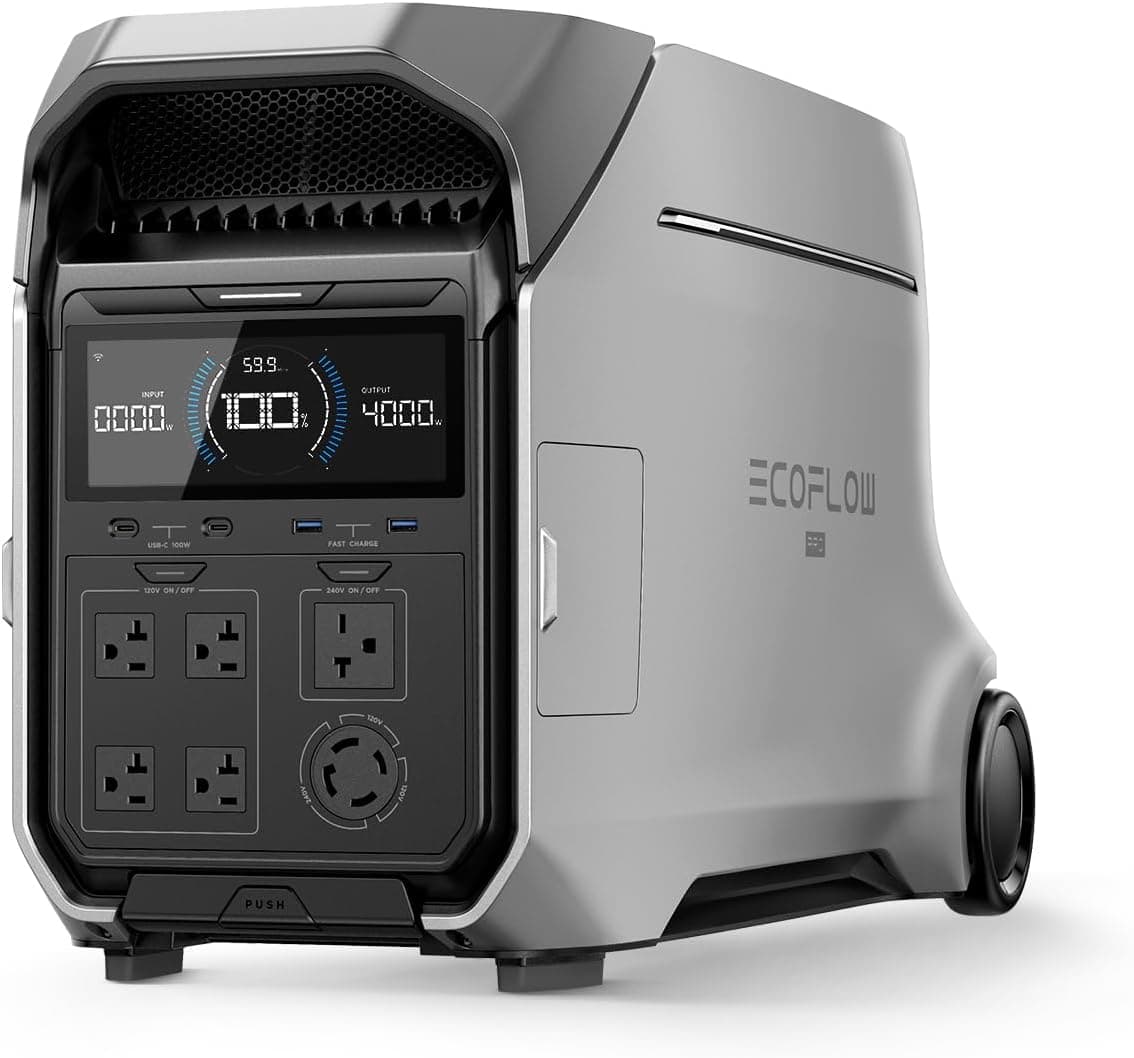
These figures come from B&H Photo's EcoFlow DELTA Pro 3 listing for the US model and Cybershack's detailed review, which tested the Australian 230V version.
| Spec | DELTA Pro 3 |
|---|---|
| Capacity | 4,096Wh |
| AC output | 4,000W continuous |
| Surge output | 8,000W with X-Boost (the reviewer also lists 6,000W momentary) |
| Battery chemistry | LiFePO4 (lithium iron phosphate) |
| Cycle life | 4,000 cycles to 80% capacity |
| Weight | 113.5 lb (51.5 kg) |
| Dimensions | 27.3 x 16.2 x 13.4 in |
| Solar input | Up to 2,600W (two inputs: 1,000W and 1,600W) |
| Total input, all sources | Up to 7,000W |
| AC input (US listing) | 1,600W |
| Fast charge | 0 to 80% in 50 minutes using supported recharging methods |
| Parallel use | Up to three units linked, for up to 12,000W of output |
| UPS switchover | 10 milliseconds or less |
| Smart Home Panel 2 switchover | 20 milliseconds |
The US listing did not show a price or warranty on the page we opened, and the reviewer tested a 230V model, so confirm the 120V and 240V outputs, the exact warranty, and the current price on EcoFlow's US product page before you buy.
What Changed From the Original DELTA Pro
The original DELTA Pro stored 3,600Wh and delivered 3,600W, which is why it appears in our earlier review. The DELTA Pro 3 raises both figures, to 4,096Wh and 4,000W, and pushes the claimed surge to 8,000W with X-Boost.
The most meaningful change for most buyers is charging: with several inputs combined, EcoFlow lists a total input of up to 7,000W and a 0 to 80% charge in 50 minutes under supported methods. That matters when you want the battery topped off between storms, or when you charge from solar and a generator-style input at the same time.
If you already own the original DELTA Pro and it covers your needs, the upgrade is not compelling by itself. If you are buying new, the newer unit is the one to compare against.
Real-World Runtime
The reviewer measured these approximate runtimes on the DELTA Pro 3:
| Load | Measured Runtime |
|---|---|
| 230W steady load | About 17.3 hours |
| Portable 50-liter fridge | About 86 hours |
| 55-inch TV (100-150W) | About 38 hours |
| 65-inch streaming TV (200-250W) | About 19.5 hours |
The same review estimates inverter efficiency near 90% and reports that the unit used about 15 to 18W just by sitting with its AC output switched on. It also found about 3,800 to 3,900Wh of usable energy in testing, which is higher than the 85% assumption we use across this site (about 3,480Wh for this unit). We keep our conservative figure for planning, since real results vary with temperature, load and battery age.
Here is what that means for the loads we have already worked out in other articles, using the conservative 3,480Wh figure:
| Load | Draw | Estimated Runtime |
|---|---|---|
| Wifi router + modem | about 18W | about 190 hours (8 days) |
| CPAP, moderate settings | about 60W | about 58 hours |
| Laptop | 60-100W | about 35-58 hours |
| Full-size fridge | about 62W average (1.5 kWh/day) | about 56 hours (2.3 days) |
| Small window AC, cycling | about 290W average | about 12 hours |
The fridge and CPAP assumptions come from our fridge runtime breakdown and CPAP runtime math. Add them together, and a household running a fridge, router, CPAP, lights and a laptop uses roughly 2.8 kWh per day, so the DELTA Pro 3 covers a bit over a day on a single charge before solar. That is why a recharge plan, not just a bigger battery, decides multi-day coverage, a point we make in our sizing chart.
The Idle Drain Nobody Mentions
A reported idle draw of 15 to 18W sounds trivial. Over 24 hours, it is 360 to 430Wh, roughly 10% of the battery every day. Left switched on with nothing plugged in, the unit would empty itself in about 9.5 to 11.5 days. The fix is simple: turn off the AC output when nothing needs it, and use the DC and USB outputs for small loads, which is a habit that applies to every large inverter-based station.
Charging: Fast, With Conditions
On a US wall outlet, EcoFlow lists 1,600W of AC input. At that rate, a full recharge from empty takes a few hours. The reviewer's Australian unit recharged in about 2.2 hours on a 10-amp outlet. The headline 50-minute 0 to 80% figure depends on combining inputs, such as solar and a higher-power source, so do not expect it from a single standard wall outlet.
Solar is where this unit stands out. The listing gives two inputs: a high-voltage input of up to 1,600W and a low-voltage input of up to 1,000W, for a combined 2,600W. The reviewer's figures show the high-voltage input accepts 30 to 150V at up to 15A, and the low-voltage input accepts 11 to 60V at up to 20A. In plain terms, you can connect several large panels in series or parallel, if their voltage and current stay inside those windows. We work through how many panels you need, and how long each setup takes, in our guide to solar panels for a 4,000Wh power station, and our solar panel guide lists real measured panel output.
Output and Surge: What 4,000W Can Start
Four thousand watts of continuous output is a lot. It comfortably covers a fridge, a freezer, a sump pump, lights, a router and a laptop at the same time. Surge capacity matters for motors: the 8,000W X-Boost figure helps with compressors and pumps, which draw much more at startup than while running, as we explain in our sump pump surge guide.
What it cannot do is run a whole house. A central air conditioner alone can draw 3,000 to 3,600W while running (for a 3-ton unit) and several times that at startup, according to Jackery's HVAC wattage guide. Even then, a 4,096Wh battery would run it for roughly an hour and a half. We cover that honestly in our guide on running central air on a power station, and our appliance chart for 4,000Wh stations shows what fits and what does not.
Expansion and Parallel Use
If 4,096Wh is not enough, the system grows. The reviewer notes the unit accepts up to two additional 4,096Wh Smart Extra Batteries, for about 12kWh total, and the US listing says up to three units can be linked for up to 12,000W of output. The catch is price: in the Australian review, each extra battery cost $3,999 AUD, close to the launch price of the main unit. Before you buy a second battery, read our breakdown of whether expandable power stations are worth it, because at that price a second complete unit or a generator may cost less per usable watt-hour.

Connecting It to Your Home
EcoFlow sells a Smart Home Panel 2 that lets a power station feed selected circuits in your house. The listing gives a 20 millisecond switchover for that panel.
This is where safety matters most. Never plug a power station or generator into a wall outlet to power the house, and never wire it into your breaker panel yourself. Backfeeding can endanger utility workers and people in your home.
Utility safety guidance, such as this advisory from Guadalupe Valley Electric Cooperative, says to have a licensed electrician install a transfer switch and to check your utility's connection rules. Hire a licensed electrician, and plan for that cost on top of the unit. Our site focuses on plug-in use and does not give installation instructions.
Noise, Heat and Build Quality
The reviewer measured the DELTA Pro 3 under 30 decibels in use, describing a quiet hum, with exhaust air reaching about 40°C. For a battery this large, that is an advantage over generators, which commonly run 50 to 85 decibels. Our noise comparison and power station vs. generator guide put those numbers in context.
The reviewer also called the build solid, praised the display and app, and noted wheels and handles, while pointing out that two people are needed to lift it and that the unit has no overall IP water-resistance rating. Keep it dry and out of the rain.
Battery Life and Care
The DELTA Pro 3 uses a LiFePO4 battery rated for 4,000 cycles to 80% capacity. That is good news for a unit that may sit idle for months, and the reason we favor this chemistry, explained in our LiFePO4 vs. lithium-ion guide.
Cycle ratings, though, say little about age. Keep the unit out of heat, since a closed hot garage can shorten life (our hot garage guide), and do not charge a cold battery below freezing (cold-weather limits). Check your manual for this model's exact temperature range.
Price and Value
The Australian review listed an RRP of $6,999 AUD and a launch special of $4,099 AUD, which shows how much street prices differ from list prices in this category. The US listing we opened did not show a price. Rather than quote a number that will be out of date, use this calculation: divide the price you see by 4,096 to get the cost per watt-hour.
| Price You Find | Cost per Wh |
|---|---|
| $3,000 | about $0.73 |
| $3,500 | about $0.85 |
| $4,000 | about $0.98 |
For comparison, the BLUETTI AC70 in our budget roundup lists at $359 for 768Wh, about $0.47 per Wh, and the Anker SOLIX C1000X launched at $1,299 for 1,056Wh, about $1.23 per Wh. Large units can be good value per Wh when discounted, but you are also paying for output, expansion and home integration that smaller units lack.
Pros and Cons
Pros
- 4,096Wh and 4,000W cover a lot of a household's essentials at once.
- Very fast charging with multiple inputs, including up to 2,600W of solar.
- LiFePO4 battery rated for 4,000 cycles.
- Quiet in the reviewer's test, under 30 decibels.
- 10 millisecond UPS switchover.
- Expandable and parallel-capable.
Cons
- At 113.5 lb, it is not portable in a practical sense.
- Many adapters and cables are extra, and the reviewer found them expensive.
- Expansion batteries cost close to the price of the main unit in the reviewed market.
- It cannot run a central air conditioner for any meaningful time.
- No overall water-resistance rating in the review.
Who Should Buy It, and Who Should Not
Buy it if your plan involves several essentials for multiple days, you have or can add solar, you want a quiet alternative to a generator, or you intend to hire an electrician to connect selected circuits. It is also a good match for a home with an expensive medical or refrigeration need where long runtime matters.
Consider something else if you only need to protect a router, phone and CPAP. A mid-size unit does that for far less, and you can carry it. If you need to run a central air conditioner, a well pump on a large 240V circuit or an entire house for days, you are looking at a larger system or a generator, not a portable battery. Our Anker SOLIX F3800 review covers the closest competitor.
FAQ
How long will the DELTA Pro 3 run a refrigerator? Using our 3,480Wh planning figure and a 1.5 kWh per day fridge, about 56 hours, or roughly 2.3 days, if nothing else is running. The reviewer's test of a small 50-liter fridge lasted about 86 hours.
Can the DELTA Pro 3 run a whole house? Not for long. It can run selected circuits through a transfer panel installed by an electrician, but heavy loads such as central air drain it quickly.
How fast does the DELTA Pro 3 charge? EcoFlow lists 0 to 80% in 50 minutes using supported methods that combine inputs. On a single standard US outlet at 1,600W, expect several hours for a full charge.
Can I charge it with solar panels? Yes, with up to 2,600W of solar input across two ports, as long as your panels fit the voltage and current limits. See our solar panel sizing guide.
Is it safe to use indoors? It has no combustion and no fumes, which is the key safety advantage over a generator. Keep it ventilated, dry and away from heat and flammable materials, and follow the manual.
How heavy is it? 113.5 lb. Plan for two people and use the wheels.
The Bottom Line
The EcoFlow DELTA Pro 3 is a capable, quiet, fast-charging home backup battery whose biggest limits are weight and price. If you need multi-day coverage of a fridge, medical equipment, communications and lights, it is among the strongest portable options, and its solar input makes extended outages more manageable. If your needs are smaller, you will get more value from a mid-size station. Check current pricing and the US spec sheet before you decide, and compare it directly with the Anker SOLIX F3800.
Specifications and pricing come from the cited sources at the time of writing and change often. Confirm current details, outputs for your region, and warranty terms on the manufacturer's site before buying.